I Built Cheats for My Own Game, Then Tried to Catch Them
A beginner's walkthrough of memory offsets, ESP, aimbots and how to detect them.
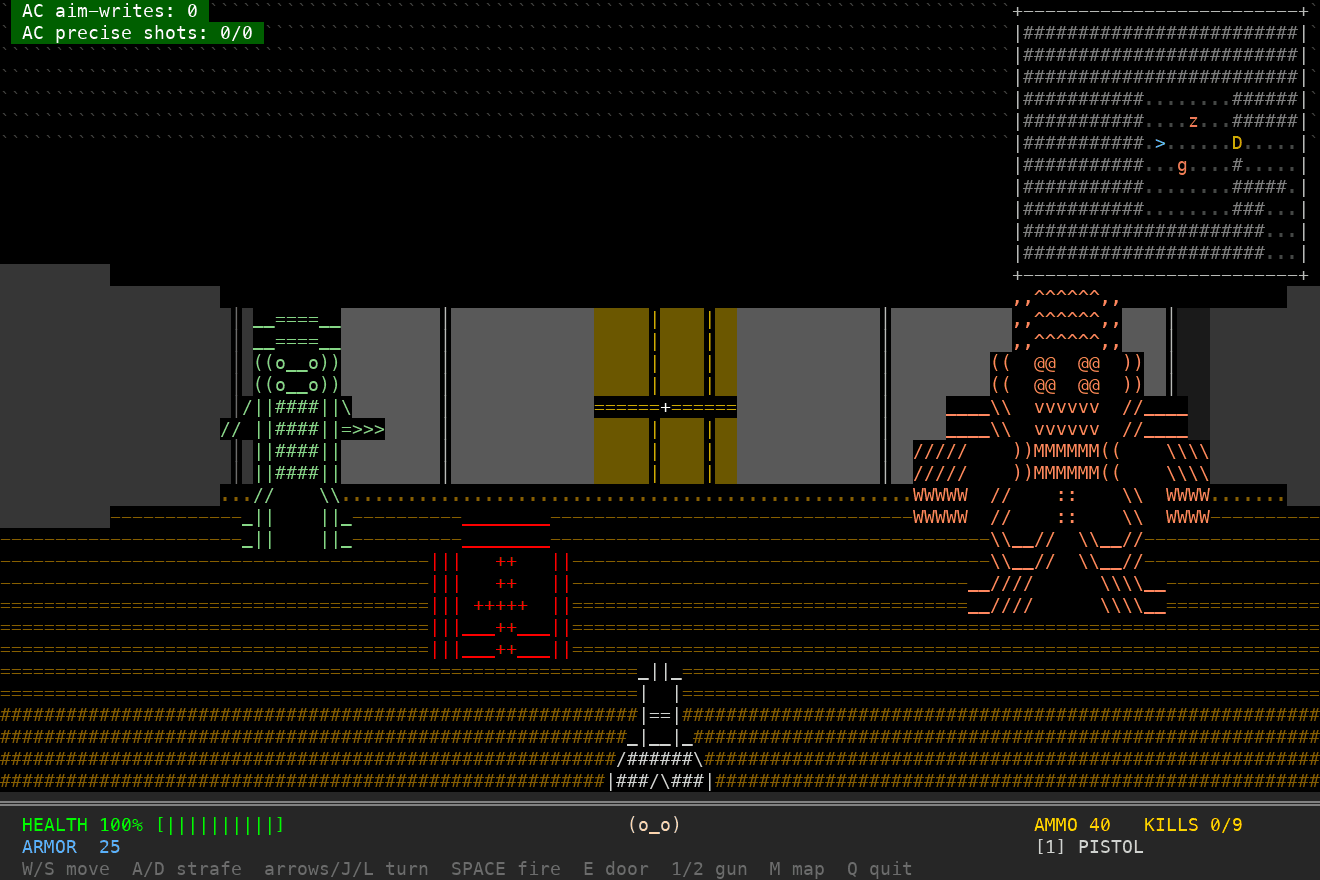 HELLGRID, the test game. The two boxes at the top left come from the Phase 4 detector build.
How does a game cheat know where your ammo is? In this guide we follow one value, ammo, from a word on the screen to its address in a running game. Then we look at how ESP and aimbots use the same idea, and build two detectors. So far, the detectors have been tested with simulated play.
The target is HELLGRID, a small ASCII shooter that runs in the terminal, made as a single-player test game for anti-cheat research. I built this project with help from an AI coding assistant (Claude Code).
You'll need: an Apple Silicon Mac, the Xcode command line tools and the HELLGRID source. It helps to know what a variable and a memory address are. No ARM64 experience is needed. Your addresses may differ if your compiler or code differs.
My environment
I developed this on macOS, a Unix operating system, on an Apple M2 with an ARM64 processor.
| Part | Version |
|---|---|
| Operating system | macOS 26.5.1 (Darwin 25.5.0) |
| Processor | Apple M2 (ARM64) |
| Compiler | Apple clang 17.0.0 |
| Debugger | lldb-1703.0.236.21 |
Why am I reading ARM64? Because of the processor and the build target. My compiler targets arm64-apple-darwin, so it produced ARM64 machine code. Unix alone doesn't decide this: Unix-like systems also run on other processors, such as x86-64.
| Part of my setup | What it affects |
|---|---|
| ARM64 processor and target | registers and instructions (ldr, str, x0) |
| macOS | the program file format (Mach-O), tools such as otool, and how one program gets access to another's memory |
| Unix features | terminal input and output (termios) and shell tools such as grep and ps |
Check your own setup:
sw_vers                    # macOS version
uname -srm                 # system, kernel version, processor architecture
clang++ --version          # compiler and its target
lldb --version             # debugger version
Results from my machine:
$ uname -srm
Darwin 25.5.0 arm64
Get the code
All the code is on GitHub: haydenthai/Hellgrid.
git clone https://github.com/haydenthai/Hellgrid.git
cd HellgridEach folder also has its own README.md. Follow the phases in order:
| Phase | Folder | What you do | Build |
|---|---|---|---|
| 1 | phase1-game | build and play the target game | make phase1 |
| 2 | phase2-reversing | find offsets in the program and check them with lldb | make phase2 |
| 3 | phase3-cheat | read the game from a separate program (ESP and aimbot) | make phase3 |
| 4 | phase4-detection | try to detect the aimbot | make phase4 |
Run all commands from the Hellgrid folder. Everything you build goes into build/. There's only one copy of the game, in phase1-game/; later phases build on it.
make          # build every phase into build/
make test     # run all tests
make clean    # delete build/ (including any files you saved there)
The big idea
A running game keeps its values in memory. To find one, we need to know where it is.
Think of a street:
- The game's data is a block of houses.
- The whole block can start in a different place each time the game runs.
- Each house is always the same distance from the start of the block.
That distance is called an offset.
address of a value = where the program starts + offsetSo we need two things:
| What | Where we get it | Changes between runs? |
|---|---|---|
| Offset | from the program file | no, for the same build |
| Load address (where the program starts) | from the running game | it can |
The load address moves because of ASLR (address space layout randomization), a security feature.
Phase 1: Build and play the game
Goal: get the target game running, so you know what the values on screen look like.
Folder: phase1-game/
make phase1        # builds build/doom
make test-game     # runs the game's built-in checks
build/doom         # play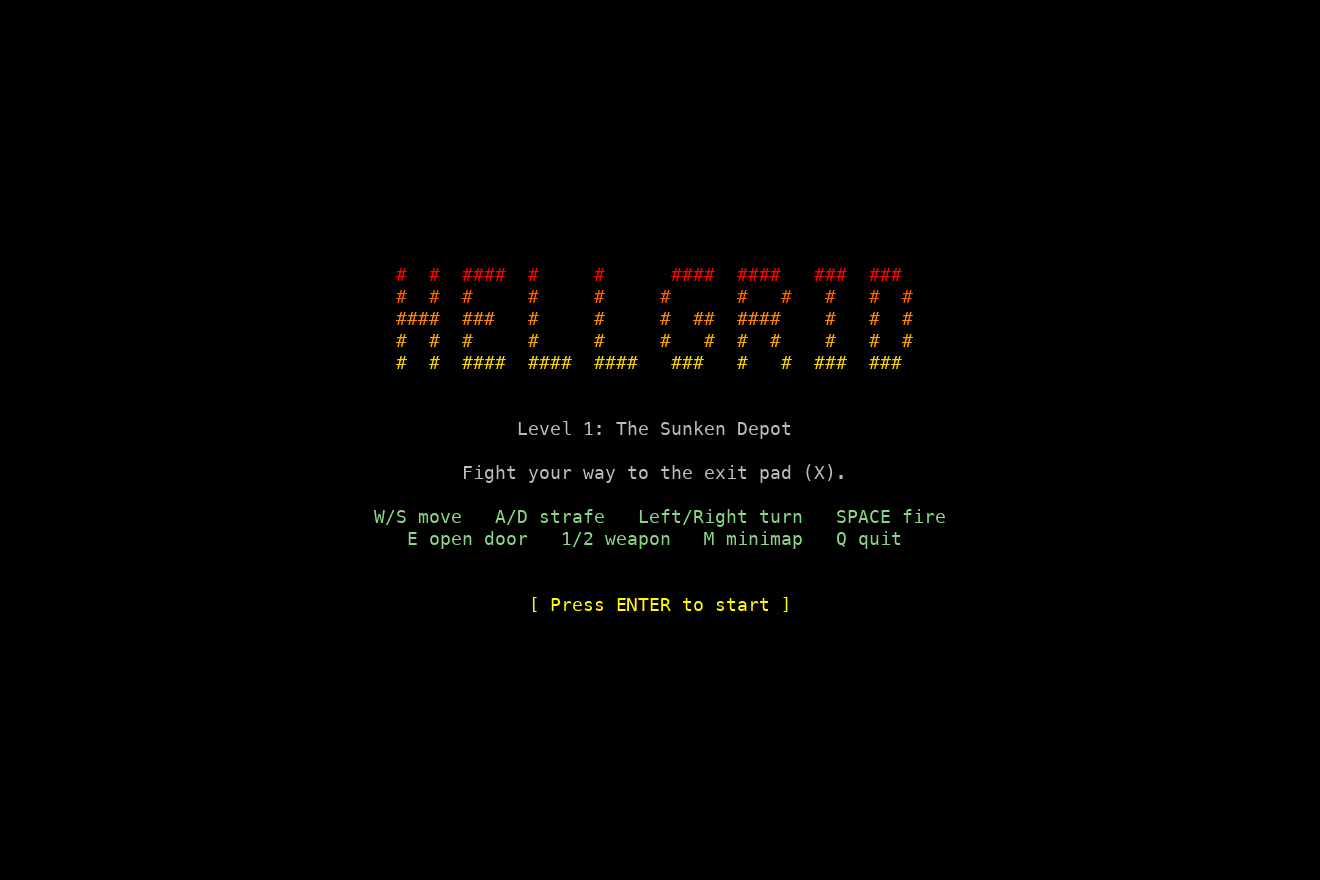
| Key | Action |
|---|---|
| W / S | move |
| A / D | strafe |
| Left / Right arrows, or J / L | turn |
| Space | fire |
| E | open a door |
| 1 / 2 | choose a weapon |
| M | map |
| Q | quit |
While you play, watch the status bar: health, armor and ammo. Ammo is the value we'll hunt in Phase 2.
The hooks
main.cpp has a few hooks: functions the game calls at certain moments. In this build they do nothing. Phase 4 fills them in.
| Hook | When the game calls it |
|---|---|
hookStart | the interactive game starts |
hookReset | a new run begins |
hookShot | a weapon fires |
hookBeforeAim | before input changes your aim |
hookAfterAim | after the game computes your new aim |
hookDraw | after the status bar is drawn |
✅ Checkpoint: make test-game reports 0 failure(s), and you can play the game.
Phase 2: Find the values in memory
Goal: find where the game keeps ammo and other values, then check it in the running game.
Folder: phase2-reversing/
make phase2 # builds build/doom_stripped and build/doom.asmSpoiler warning
phase1-game/main.cpp and phase3-cheat/hax.cpp are the answer key. For practice, try each step before opening them.
2.1 Open up the program
make phase2 creates two files:
build/doom_stripped: a copy of the game made withstrip, which removes local symbol names. Names like our game state variable don't give away the answer.build/doom.asm: the disassembly fromotool, which is the machine code in readable form. Text strings are still there, and they make great clues.
The commands behind make phase2
clang++ -std=c++17 -O2 -Wall -o build/doom phase1-game/main.cpp
strip -o build/doom_stripped build/doom
otool -tvV build/doom_stripped > build/doom.asm
Check which processor the program was built for:
$ file build/doom_stripped
build/doom_stripped: Mach-O 64-bit executable arm64
2.2 Learn just enough ARM64
Apple Silicon uses ARM64. A register is a tiny storage slot inside the processor, such as x8 or w0. (w8 is the lower half of x8.)
| Instruction | Plain English |
|---|---|
adrp x8, ... | point x8 at a 4 KB block (page) of memory |
add x8, x8, #8 | add 8 to x8 |
ldr w0, [x8, #0x1c] | read from address x8 + 0x1c into w0 |
str w0, [x8, #0x1c] | write w0 to address x8 + 0x1c |
subs w8, w9, w8 | w8 = w9 - w8, and remember how the result compares |
b.ge somewhere | jump if that comparison was "greater than or equal" |
bl something | call a function |
Square brackets in ldr and str mean "the memory at this address".
Know MIPS?
It'll feel familiar. lw is like ldr, sw is like str, and jal is like bl.
2.3 Find ammo
The method:
- Pick something you can see in the game.
- Find it in the assembly.
- Follow the value: where did it come from?
- Work out the address.
- Test it in the running game.
Search for the on-screen text
The status bar shows AMMO 40. Search build/doom.asm for "AMMO " (with the space).
Read upward
These are the important lines (shortened):
adrp x8, 14 ; 0x100014000      ; ④ x8 = start of the game data
ldr  w0, [x8, #0x1c]           ; ③ read a number at x8 + 0x1c
add  x8, sp, #0xb8             ;   (x8 gets a new job here)
bl   0x10000ad44               ; ② to_string: turn the number into text
adrp x2, 6 ; 0x10000c000
add  x2, x2, #0x38e            ; ① "AMMO "  <- the search lands here
Read it from ① to ④:
- We found the label.
- Just above it, a number is turned into text. The number to convert is passed in
w0. w0was read fromx8 + 0x1c.- At that moment,
x8was0x100014000.
The label alone isn't proof. The evidence is the path: a number is read, turned into text, and joined to "AMMO ".
Common confusion
The add on the "AMMO " line doesn't find your ammo. It only builds the address of the text.
 The ammo load and the text label, highlighted.
Do the math
  0x100014000    start of the game data (we'll call it G)
+ 0x1c           offset of ammo inside G
= 0x10001401c    ammo, as the file sees it

  0x10001401c
- 0x100000000    where the file assumes the program starts
= 0x1401c        ammo's offset from the start of the program
You won't find 0x1401c written as one number in this code. You build it from the pieces.
2.4 Read it from the running game
Terminal 1: start the game and press Enter.
build/doom_strippedTerminal 2: make sure there's only one copy running, then attach.
pgrep -x doom_stripped      # should print ONE number (the process ID)
sudo lldb -p <PID>
Attaching pauses the game. That's normal. At the (lldb) prompt:
image list doom_strippedExample output:
[ 0] 2E7EF816-A6F7-3708-8D75-0DC88164BB1A 0x0000000102684000 .../build/doom_strippedThe long ID identifies the build. The number after it, 0x102684000, is the load address for this run. Add the ammo offset:
memory read -f d -s 4 -c 1 0x102684000+0x1401c| Part | Meaning |
|---|---|
-f d | show a decimal number |
-s 4 | each value is 4 bytes (w0 holds 4 bytes) |
-c 1 | show one value |
At the start of a game, this should show 40.
Prove it
- Type
continueto unpause. - Fire a few shots in the game.
- Press Ctrl-C in
lldb. - Run the same
memory readagain.
The value should match the ammo on screen. When you're done, type detach, then quit.
2.5 Find where ammo is spent
Reading ammo for the screen is one thing. Which code changes it?
Search for "OUT OF AMMO" and read upward:
; earlier: w8 = cost of a shot (1, or 2 for the second weapon)
adrp x9, 18 ; 0x100014000
ldr w9, [x9, #0x1c] ; read current ammo
subs w8, w9, w8 ; remaining = ammo - cost
b.ge 0x10000377c ; enough? jump there
; otherwise: "OUT OF AMMO"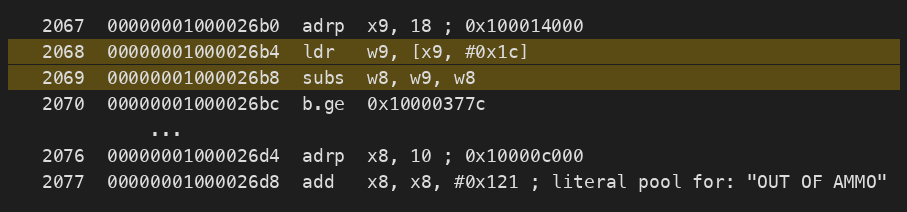 Reading ammo and subtracting the shot cost.
Search for 000000010000377c. A few lines down:
str w8, [x20, #0x14] ; save the new valueWhy 0x14 and not 0x1c? Search upward to where x20 was set:
adrp x20, 18 ; 0x100014000
add  x20, x20, #0x8            ; x20 = G + 8
So the write goes to G + 0x8 + 0x14 = G + 0x1c. It's ammo.
The most useful lesson here
The number in the brackets is measured from whatever the register holds. That isn't always the start of the object. Searching only for #0x1c would miss this write.
2.6 More values
Armor follows the same pattern as ammo. Search "ARMOR " (two spaces) and look just above: ldr w0, [x8, #0x18].
Health is harder. Its read, ldr w0, [x27, #0x14], is far above the "HEALTH " text, and x27 is set to 0x100014000 even earlier. Code jumps around, so the line above isn't always what ran before. Confirm it live.
Starting values give another clue. The startup code copies two blocks of 16 bytes into G:
xxd -e -s 0xb2d0 -l 32 build/doom_strippedThey decode to 1.5, 1.5, 0.0, 0.0 (decimal-point numbers, from G+0x00) and 100, 25, 40, 1 (whole numbers, from G+0x14): matching position, health, armor, ammo and weapon.
| Value | Offset in G | Offset from program start | Type |
|---|---|---|---|
| X position | 0x00 | 0x14000 | float |
| Y position | 0x04 | 0x14004 | float |
| Aim angle | 0x08 | 0x14008 | float |
| Health | 0x14 | 0x14014 | int |
| Armor | 0x18 | 0x14018 | int |
| Ammo | 0x1c | 0x1401c | int |
| Weapon | 0x20 | 0x14020 | int |
| Enemy and item list | 0x28 | 0x14028 | pointers |
| Door list | 0x40 | 0x14040 | pointers |
| Map | 0x58 | 0x14058 | pointers |
| Game mode | 0x70 | 0x14070 | int |
Build ID for these offsets: 2E7EF816-A6F7-3708-8D75-0DC88164BB1A. They were first found in build 50ECC0E2-7B6F-34F3-81F3-95039497B3D2; after the project was reorganised, the rebuild had a new ID but the same disassembly. Check yours with otool -l build/doom_stripped | grep uuid. A rebuild can change the ID even when the machine code is the same. If yours differs, check the addresses before relying on them.
Try it yourself
Search for " KILLS " (three spaces before, one after). This time the value is read after the label.
- What offset is the kill count at?
- Which instructions increase it?
Mistakes that are easy to make
I ran into both of these.
"I fired, but ammo still says 40"
Two copies of the game turned out to be running: an old one with no terminal, paused under the debugger, and a new one. pgrep returned both process IDs, and lldb attached to the old one.
Fix: in lldb, type kill to end the old copy, then quit. Check that pgrep shows one process before attaching again.
Clue to watch for: if the game you're playing doesn't freeze when you attach, you may have the wrong one.
"I got -1186986744"
I used 0x184ae5328 as the base. That address came from the lines lldb prints when it pauses, which belonged to a macOS system library.
Fix: get the base from image list doom_stripped.
Lesson: a strange value is a reason to check both the process and the address.
✅ Checkpoint: you can explain how 0x1401c is built, and reading it with lldb shows 40 at the start of a game.
Phase 3: Build ESP and an aimbot
Goal: see how a separate program can use the Phase 2 offsets.
Folder: phase3-cheat/
Test status
The tool in this section compiles. Its reading and aiming logic passed tests against the test program's own memory. It hasn't been confirmed against the live game.
The project's tool, hax.cpp, is a separate program for this test game. Once it knows the offsets, it can read the game's data.
make test-cheat     # checks the offsets against the test program's own memory
make phase3         # builds build/hax
Then use two terminals:
build/doom          # terminal 1: the game
sudo build/hax      # terminal 2: the tool
The tool looks for a process named doom. For doom_stripped or doom_ac, pass the process ID: sudo build/hax <PID>. To make positions match, give both terminals the same size.
It draws in its own window. t cycles the aimbot (off, snap, smooth), [ and ] change the aim angle limit, and q quits.
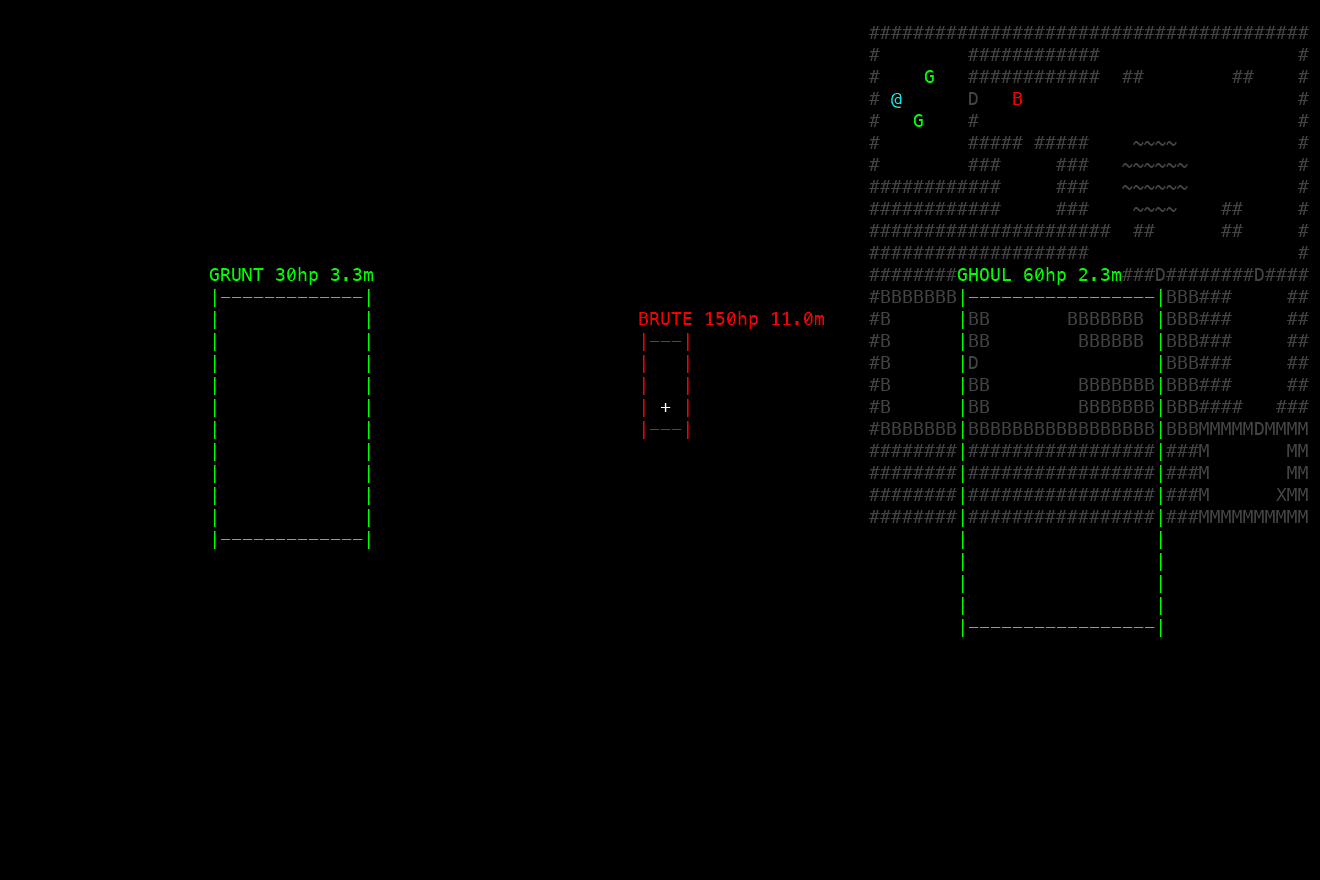 The ESP view, drawn by the tool's code reading a test program's own memory. Green enemies are visible. The red Brute is behind a closed door.
3.1 Reading the game
It asks macOS for access to the game process with task_for_pid (we used sudo), then reads memory:
bool read(uint64_t addr, void* out, size_t n) const {
    mach_vm_size_t got = 0;
    return mach_vm_read_overwrite(task, addr, n, (mach_vm_address_t)out, &got) == KERN_SUCCESS && got == n;
}
Enemies are in a list (std::vector) that can move around in memory. In this build, G+0x28 holds a pointer to its start, followed by a pointer to its end. The tool follows these. Each entry is 0x40 bytes:
| Field | Offset in entry |
|---|---|
| Type | 0x04 |
| X | 0x08 |
| Y | 0x0c |
| Health | 0x14 |
| Alive | 0x24 |
The list also holds pickups and fireballs, so the tool checks the type.
3.2 ESP: showing enemies through walls
ESP turns a position in the game world into a position on screen:
- Where is the enemy relative to me?
- Rotate that to match where I'm facing, giving forward and sideways distance.
- Divide by the forward distance, so far things look smaller.
float rx = e.x - s.x, ry = e.y - s.y;
float depth = rx * cs + ry * sn, lateral = -rx * sn + ry * cs;
if (depth <= 0.2f) continue;  // behind the camera
int cx = (int)(c.w / 2 + fx * lateral / depth);
Here cs and sn are the cosine and sine of your aim angle. ESP only reads.
3.3 Aimbot: turning toward an enemy
atan2 gives the direction from you to the enemy. Subtracting your aim angle tells you how far to turn.
static float angleTo(const Snapshot& s, const Ent& e) {
    return std::remainder(std::atan2(e.y - s.y, e.x - s.x) - s.dir, 2 * PI);
}
remainder keeps the turn the short way around.
- Snap turns the whole way at once.
- Smooth turns in small steps.
static float aimAt(const Snapshot& s, const Ent& e, AimMode mode, float dt) {
    float delta = angleTo(s, e);
    if (mode == AimMode::Smooth) delta = std::max(-4.0f * dt, std::min(4.0f * dt, delta));
    return std::remainder(s.dir + delta, 2 * PI);
}
This version then writes the new angle into the game:
proc.write<float>(g + off::PlayerDir, aimAt(s, s.ents[target], aim, dt));That's its only write to the game. You still fire yourself.
3.4 Does an aimbot have to write memory?
| Design | Writes game memory? | What it does |
|---|---|---|
| Aim guide | no | tells you which way to turn |
| Input-based aimbot | no | reads memory, then sends fake input |
| Memory aimbot (this one) | yes | changes the aim angle directly |
✅ Checkpoint: make test-cheat reports 0 failure(s).
Phase 4: Catch the cheat
Goal: add two detectors to the game and test them.
Folder: phase4-detection/
make phase4         # builds build/doom_ac
build/doom_ac| File | Purpose |
|---|---|
doom_ac.cpp | the Phase 1 game with its hooks filled in |
anticheat.h | the two detectors |
ac_test.cpp | tests with simulated play and aim writes |
The detectors only warn and log. doom_ac.cpp defines WITH_ANTICHEAT, includes phase1-game/main.cpp and fills in the hooks from Phase 1. The game isn't copied, and the normal build/doom is unchanged.
#define WITH_ANTICHEAT
#include "../phase1-game/main.cpp"
#include "anticheat.h"
Warnings appear in the top-left corner, and events are added to anticheat_log.csv in the folder you run it from.
4.1 Detector 1: did something else change my aim?
Idea: only the game's input code should change the aim angle. So:
- When the game writes a new angle, remember a copy.
- Before using the angle next time, compare.
- If they differ, something else changed it.
It's like putting a piece of tape across a door: if it's broken, someone opened it.
void checkAim(float time, float current) {
if (!armed || bits(current) == (shadow ^ key)) return;
float delta = std::remainder(current - value(shadow ^ key), 6.2831853f);
lastTamperDeg = std::fabs(delta) * 57.29578f;
tampers++;
write(time, "tamper", lastTamperDeg);
}
void trustAim(float computed) { shadow = bits(computed) ^ key; armed = true; }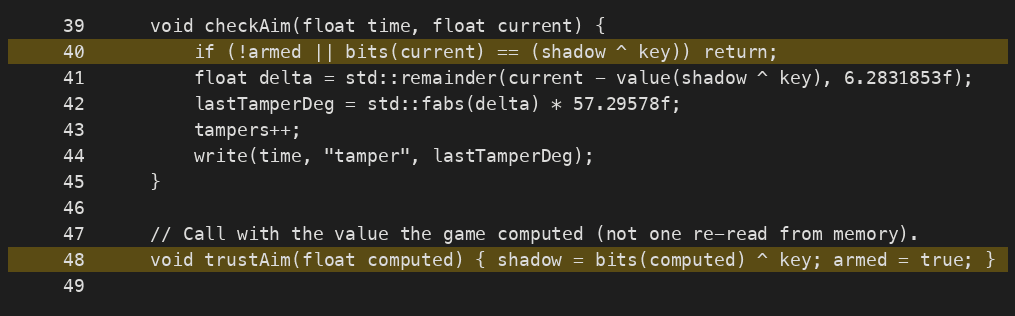 The same code in
anticheat.h. The highlighted lines do the compare and save the copy.
The game calls two hooks around its own aim update:
hookBeforeAim(G);    // 1. was it changed behind our back?
float turned = std::remainder(p.dir + in.turn * 2.4f * dt, 2 * PI);
p.dir = turned;      // 2. the game's own change
hookAfterAim(turned);  // 3. remember what we calculated
doom_ac.cpp connects those hooks to the detector:
static void hookBeforeAim(const GameState& g) { AC.checkAim(g.time, g.player.dir); }

static void hookAfterAim(float computedDir) { AC.trustAim(computedDir); }
Two details:
trustAimsaves the value the game calculated. It doesn't readp.diragain, which something could have changed in between.- The copy is combined with a random key using XOR (
^), so it isn't stored as a second, identical number. This is only light hiding, not strong protection.
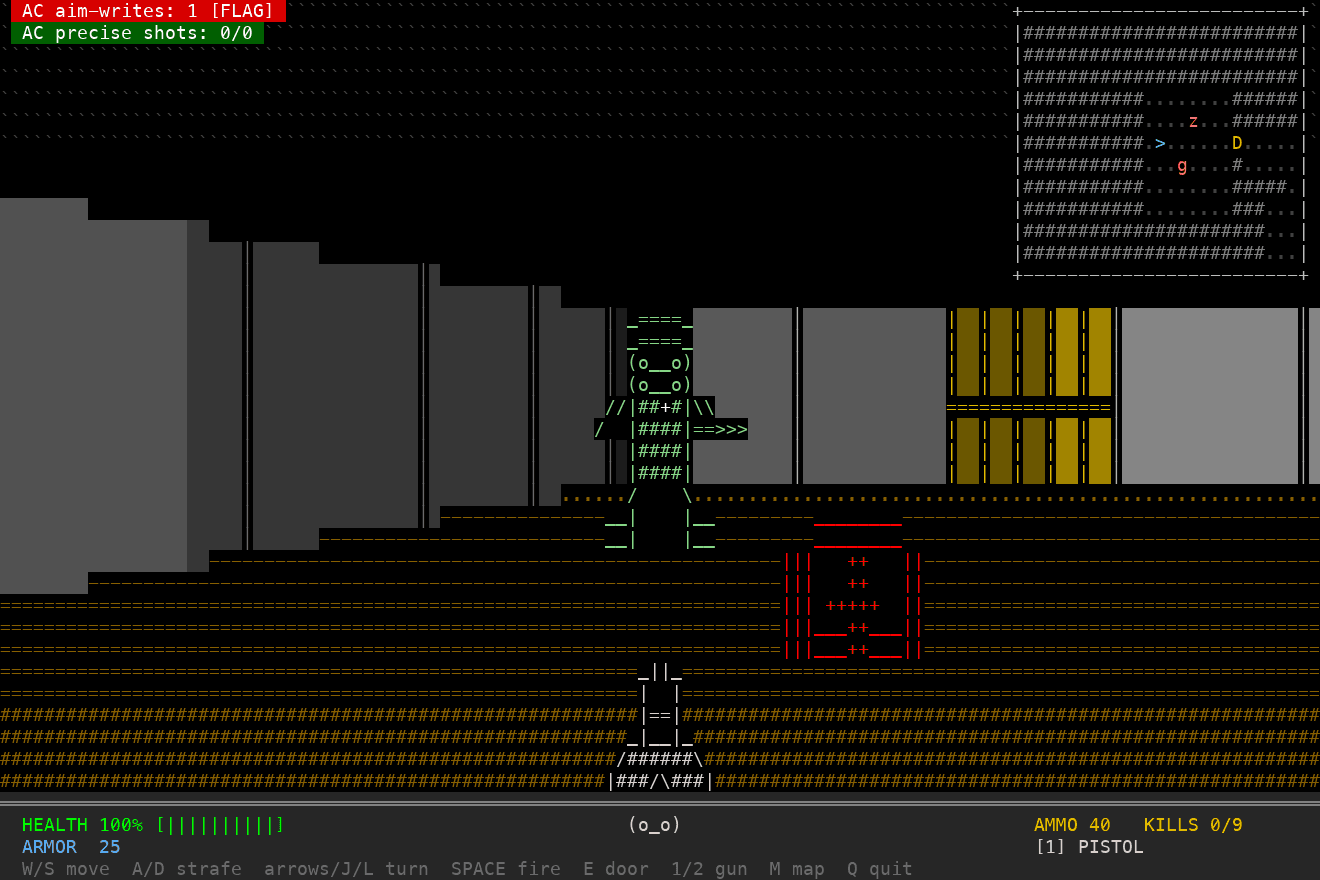 The warning after the test program changed the aim angle from outside the input code.
4.2 Detector 2: is the shooting too perfect?
This one looks at behaviour, so it doesn't depend on seeing a memory write.
For each shot fired within 20° of a visible enemy, it measures how far off centre the aim is. It marks the session suspicious when:
- there are at least 8 such shots, and
- at least 60% are within 0.5° of the enemy's centre.
void recordShot(float time, float errorDeg) {
    aimedShots++;
    if (errorDeg < PRECISE_DEG) preciseShots++;
    write(time, "shot", errorDeg);
}

bool behaviourFlag() const { return aimedShots >= MIN_SHOTS && preciseRatio() >= FLAG_RATIO; }
These limits are starting guesses. I haven't tuned them with real play.
4.3 Run the tests
make test-detectionPASS normal keyboard turning raises no aim-write flag
PASS snap write is detected
PASS smooth write is detected
PASS repeated near-perfect shots are marked suspicious
PASS imperfect shots are not marked suspicious
0 failure(s)What this does and doesn't show
The test runs inside one program, with scripted input and simulated writes using the cheat's aiming code. It shows the detector logic works in these cases. It doesn't show how well it catches the separate cheat during real play, or how often it flags honest players.
4.4 Where they fall short
| Limit | Why |
|---|---|
| Detector 1 won't flag fake input by itself | the game changes its own aim normally |
| Detector 1 runs inside the game | a cheat that can write memory could also tamper with the detector |
| Detector 2 can flag honest players | an enemy walking straight toward a still player can stay centred |
| Detector 2 can miss cheats | one that doesn't aim this precisely may stay under the limits |
| Neither detects ESP | reading memory changes none of the checked values |
For ESP, one defence to explore is a server that only sends the enemy data a player should know about.
4.5 Next: test against the real cheat
- Run
build/doom_acand play normally. Note any warnings. - In another terminal, run
sudo build/hax <PID>(get the ID withpgrep -x doom_ac). - Play with the aimbot off, then snap, then smooth. Restart the game between runs.
- Compare the on-screen warnings and the log.
✅ Checkpoint: make test-detection reports 0 failure(s). This covers simulated play only.
Appendix: my lldb session
This is what I typed while trying to read ammo, including the mistake. I recorded it on an earlier build, so the build ID and file paths differ from the ones above. Your process IDs and addresses will differ too.
Attach to the game
sudo lldb -p $(pgrep -x doom_stripped)| Part | Meaning |
|---|---|
sudo | run with administrator rights |
lldb | start the debugger |
-p | attach to a running process by its ID |
pgrep -x doom_stripped | find IDs of processes with exactly this name |
$( ... ) | run the inner command and insert its output |
Output (shortened):
(lldb) process attach --pid 23984
Process 23984 stopped
* thread #1, queue = 'com.apple.main-thread', stop reason = signal SIGSTOP
    frame #0: 0x0000000184ae5308 libsystem_kernel.dylib`__semwait_signal + 8
Target 0: (doom_stripped) stopped.
Architecture set to: arm64-apple-macosx-.
"Stopped" means paused. The __semwait_signal line shows it paused inside a macOS wait function.
This one-line command is only safe when one copy of the game is running. Run pgrep -x doom_stripped by itself first.
Find the load address
(lldb) image list doom_stripped
[  0] 50ECC0E2-7B6F-34F3-81F3-95039497B3D2 0x0000000102684000 /Users/<me>/.../doom_stripped
An image here is a loaded program or library. The columns are its number in the list, build ID, load address and file path.
Read ammo
(lldb) memory read -f d -s 4 -c 1 0x102684000+0x1401cThis reads one 4-byte number at 0x10269801c and shows it in decimal. I saw a value of 40.
The wrong base address
(lldb) memory read -f d -s 4 -c 1 0x184ae5328+0x1401c
0x184af9344: -1186986744
The command ran, but 0x184ae5328 came from the system library code, not from my game's load address. A command that runs isn't necessarily reading the right thing.
Command reference
Run these from the Hellgrid folder.
Phase 1: the game
| Command | What it does |
|---|---|
make phase1 | build the game with optimizations |
make test-game | run the game's built-in checks |
build/doom | play |
Phase 2: inspect the program
| Command | What it does |
|---|---|
make phase2 | make the stripped copy and the disassembly |
file build/doom_stripped | show file type and processor architecture |
nm -m build/doom | list symbol names (try the unstripped build) |
otool -l build/doom_stripped | show the file's layout, sections and build ID |
otool -l build/doom_stripped | grep -A4 'sectname __bss' | find the __bss section |
grep -nE 'literal pool for: ".*AMMO' build/doom.asm | find ammo-related text, with line numbers |
grep -nE '#0x539|#0x8965' build/doom.asm | find the random number generator clues |
xxd -e -s 0xb2d0 -l 32 build/doom_stripped | show 32 bytes containing the starting values |
Phase 2: check running processes
| Command | What it does |
|---|---|
pgrep -x doom_stripped | list the game's process IDs |
ps -axo pid,ppid,stat,tty,lstart,command | grep -E '[d]oom|[l]ldb|[d]ebugserver' | show game and debugger processes, their state, terminal and start time |
The ps command is how the two copies of the game were spotted.
Phase 3: external tool
| Command | What it does |
|---|---|
make test-cheat | build and run the offset tests |
make phase3 | build the ESP and aimbot tool |
sudo build/hax | run it against doom |
sudo build/hax <PID> | run it against doom_stripped or doom_ac |
Phase 4: detectors
| Command | What it does |
|---|---|
make phase4 | build the game with detectors |
make test-detection | build and run the detector tests |
cat anticheat_log.csv | view logged shots and aim changes |
Cheat sheet
address = load address + offset- Start with something visible: text or a number.
- Find the code that uses it.
- Follow the value through the registers.
- Check what the base register holds.
- Test in the running game.
| Task | Command |
|---|---|
| Disassemble | make phase2 |
| Find the process | pgrep -x doom_stripped |
| Attach | sudo lldb -p <PID> |
| Get load address | image list doom_stripped |
| Read an int | memory read -f d -s 4 -c 1 <ADDR> |
| Read 3 floats | memory read -f f -s 4 -c 3 <ADDR> |
| Resume / pause | continue / Ctrl-C |
| Leave | detach, then quit |
Do you need Ghidra? Not for these steps. It can make larger programs easier to explore by showing C-like pseudocode and references. Check its guesses against the assembly and the running game.